0 ratings

Item #:
37567037
USB Floppy Disk Drive Emulator N-Drive Industrial Replacement for 5.25" Floppy Drive
Item #:
37567037
AUD 867
Price Details
Excluding Shipping & Custom charges ( Shipping and custom charges will be calculated on checkout )
*All items will import from US
Afterpay Information

Split your bill into 4 payments of AUD 216.75 interest-free
 Add the item to your cart
 Select Afterpay at checkout
 Fill in your details
 Complete your first payment
and pay the remaining in easy instalments or according to the payment plan you selected
Here’s why you should Afterpay it

Get everything you need now..
Shop thousands of brands and millions of products, online and in-store.

Pay over six weeks.
Make the first payment upfront and the rest over time. Always interest-free when you pay it in 4.

No fees when you pay on time.
We’ll send you reminders and cap late payments to help you get back on track.
(1) Terms and conditions. apply. (2) Installment Agreement. (3) Eligible for customers in. Australia, (4) Your final payment plan may vary depending on your credit history.
0 ratings
Write a review
In stock
 Imported from USA store
QTY:
Order now and get it around Thursday, August 20
Secured transaction
Ubuy works hard to protect your security and privacy. Our advanced payment security system ensures confidentiality by encrypting your information during transmission using AES (Advanced Encryption Standards) and SSL (Secure Socket Layer) protocols. Your payment details are 100% secure as we do not share your payment details with third party sellers.
Our Top Logistics Partners


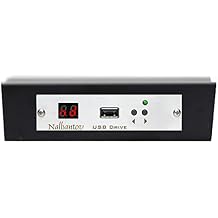
Nalbantov USB Floppy Emulator N-Drive Industrial can be installed on almost any equipment, manufactured with a floppy drive. The emulator provides high level of data protection through USB port. You can store up to 100 floppy disks in a single USB flash drive.

Buy Now Pay Later

Fast
Shipping

Free
Return*

Secure Packaging

100% Original Products

PCI DSS Compliance

ISO 27001 Certified


Note: Step Down Voltage Transformer required for using electronics products of US store (110-120). Recommended power converters Buy Now.


What Stands Out
Modern Interface
The USB Floppy Disk Drive Emulator N-Drive offers a seamless transition from traditional floppy drives to a USB interface, making it compatible with modern systems while preserving access to legacy data.
Industrial Durability
Built for industrial use, the N-Drive provides robust performance in demanding environments, ensuring reliability and longevity compared to typical floppy drive emulators, which may lack in durability.
Easy Installation
Designed for hassle-free setup, this emulator allows users to easily replace their 5.25" floppy drives without complex configurations, making it ideal for both experienced tech users and novices.
Product Details
- Nalbantov USB Floppy Emulator can replace almost any equipment with a floppy drive
- Offers high level of data protection through USB port
- Can store up to 100 floppy disks in a single USB flash drive
- Compatible with various floppy drive brands including Teac, Sony, Panasonic, and more
- Same size and connectors as existing floppy drives for easy replacement
- Included software supported by Windows 2008, XP, Vista, 7, 8, 10 and optionally Windows 98, Me, 2000, Mac OS
| Item Weight | 1.5 lbs (680 grams) |
Who Should Buy?

-
Retro Computer Users
Ideal for enthusiasts of vintage computing equipment who want to utilize floppy drives without using physical disks.
-
Industrial Applications
Designed for industrial environments needing reliable and efficient data transfer from legacy floppy systems without mechanical issues.
-
Data Recovery Professionals
Beneficial for professionals aiming to recover or access old data stored on 5.25" floppy disks using modern technology.

-
General Consumers
Not suitable for average consumers looking for a modern data storage solution; it caters to niche applications and devices.
-
High-Frequency Use
May not withstand frequent use in fast-paced environments where constant data retrieval and write cycles are required.
-
Non-Compatible Devices
Incompatible with systems and devices that do not support 5.25" floppy drives, limiting its utility in many setups.
Product Description
USB Floppy Disk Drive Emulator N-Drive Industrial Replacement for 5.25" Floppy Drive
About This Item
Introducing the Nalbantov USB Floppy Disk Drive Emulator - the perfect industrial replacement for your outdated 5.25" floppy drive. Are you still relying on legacy industrial systems that require floppy disks? Upgrade to the Nalbantov USB Floppy Disk Drive Emulator and say goodbye to the hassle of finding and maintaining floppy disks. With this innovative device, you can easily emulate the functionality of a floppy disk drive using a USB drive.
Simply plug in a USB stick loaded with your desired files and the Nalbantov USB Floppy Disk Drive Emulator will seamlessly simulate a floppy disk drive, allowing you to access and store your crucial data on a more reliable and modern medium. Designed specifically for industrial use, this floppy drive emulator is built to withstand the demands of rigorous environments. Its robust construction ensures durability and longevity, making it the ideal replacement for your outdated floppy drive in any industrial setting. The Nalbantov USB Floppy Disk Drive Emulator is not only a practical solution for legacy systems, but it also offers the convenience of USB storage. You can easily transfer files to and from your computer using a USB stick, eliminating the need for antiquated floppy disks. Upgrade your legacy systems with ease and efficiency using the Nalbantov USB Floppy Disk Drive Emulator.
Don't let outdated technology slow you down. Take advantage of this industrial replacement and streamline your operations today. Please note that this product is specifically designed to be a replacement for 5.25" floppy drives and is not compatible with other sizes. Additionally, ensure that your legacy industrial systems are compatible with USB drives before purchasing the Nalbantov USB Floppy Disk Drive Emulator. Experience the convenience and reliability of this industrial floppy drive emulator now.
Upgrade to the Nalbantov USB Floppy Disk Drive Emulator and revolutionize your workflow.
Have any Query? Chat with us
Customer Questions & Answers
-
Question:
What is the USB Floppy Disk Drive Emulator N-Drive?
Answer: The USB Floppy Disk Drive Emulator N-Drive is a modern solution designed to replace traditional 5.25-inch floppy drives. It enables users to access floppy disk functionalities without the need for actual floppy disks. With this emulator, you can utilize USB flash drives to emulate a floppy disk, making it a practical option for vintage computing or industrial applications. This is particularly useful for users needing to read or write data on legacy systems where floppy disks were once the standard. -
Question:
How does the N-Drive emulator connect to a computer?
Answer: The N-Drive emulator connects via a standard USB port. It is designed to be a plug-and-play device, allowing for easy installation on most systems that support floppy drives. Once connected, the emulator recognizes the USB drive as a floppy disk, enabling seamless data transfer and access. This makes it ideal for users who require quick access to data stored on USB drives while using older hardware without the hassle of maintaining physical floppy disks. -
Question:
Can the N-Drive emulator read/write data to USB drives?
Answer: Yes, the N-Drive emulator allows for both reading from and writing to USB drives formatted as floppy disks. Users can transfer files back and forth efficiently, thanks to its compatibility with multiple formats. It supports various USB flash drives, making it versatile for different types of data transfers in industrial settings or retro computer uses. This feature is essential for preserving valuable data and maintaining the functionality of legacy systems. -
Question:
Is the N-Drive emulator compatible with all operating systems?
Answer: The N-Drive emulator is compatible with a range of operating systems, including Windows, Linux, and macOS. However, compatibility may vary depending on the specific configuration of your system. Users are encouraged to check for any updates or compatibility lists available on the manufacturer’s website to ensure full functionality. This cross-platform capability enhances its utility, especially in environments that mix different operating systems. -
Question:
How can I format my USB drive for use with the N-Drive emulator?
Answer: To format your USB drive for use with the N-Drive emulator, you typically need to use FAT32 file format. This format is recognized by most operating systems and mimics the structure of a floppy disk. Using your system’s disk management tool, you can format the USB drive by selecting FAT32 from the file system options. This ensures smooth operation and data transfer, allowing you to utilize your USB drive with the emulator effectively. -
Question:
What type of users would benefit from using the N-Drive emulator?
Answer: Various user groups benefit from the N-Drive emulator. This includes retro computing enthusiasts who want to revive older systems, engineers and technicians working with legacy industrial machines, and archivists managing old software and data. Additionally, it serves educational institutions looking to teach students about vintage computing concepts. The emulator bridges the gap between modern storage technology and older hardware, accommodating diverse needs. -
Question:
Does the N-Drive emulator support multiple USB drives at once?
Answer: The N-Drive emulator is designed to support one USB drive at a time. However, you can switch out USB drives easily, allowing you to use multiple drives sequentially. Just ensure you properly eject the current drive before inserting a new one. This flexibility makes it convenient for users needing to access different data sets, though it does require users to manage their files accordingly. -
Question:
What installation steps are required for the N-Drive emulator?
Answer: Installation of the N-Drive emulator involves a few straightforward steps. First, connect the emulator to your device’s floppy drive interface. Then, connect your USB flash drive to the emulator. Power up your computer, and it should automatically recognize the emulator as a floppy drive. No additional software is generally required, making it a user-friendly solution for accessing and managing your data seamlessly. -
Question:
Can the N-Drive emulator be used for data backup?
Answer: Yes, the N-Drive emulator is useful for data backup, particularly for files stored on legacy floppy disks. By transferring data from floppy disks to a USB drive, users can securely back up essential files while also allowing ongoing access to older formats. This process helps in preserving data that might otherwise be lost due to floppy disk degradation, making it an excellent solution for archiving important information. -
Question:
Where can I buy the USB Floppy Disk Drive Emulator N-Drive Industrial Replacement for 5.25 Floppy Drive?
Answer: You can purchase the USB Floppy Disk Drive Emulator N-Drive Industrial Replacement for 5.25 Floppy Drive at Ubuy, which offers a variety of electronics and accessories. Ubuy features a comprehensive selection of products and often provides international shipping options, allowing you to effortlessly acquire the emulator regardless of your location within Australia.
Nalbantov USB Flash Drives Editorial Review
No editorial reviews found
Customer Reviews & Ratings
1 customers ratings
-
5 Star
0%
-
4 Star
100%
-
3 Star
0%
-
2 Star
0%
-
1 Star
0%
Review this product
Share your thoughts with other customers
Platform Trust & Buyer Confidence

JB
Jane
Verified buyer
“Great continuous communication. Packaged well. Arrived promptly.”
12 June 2026 · via Trustpilot
MM
MAV MTBLife
Verified buyer
“1st buy, Ubuy. Shopping made easy if you don't mind the international shipping cost. Bought the product I wanted and the shipping was fast. I look forward for next shopping☺️”
10 June 2026 · via Trustpilot
AP
amanda
Verified buyer
“Great communication, prompt delivery.”
7 June 2026 · via Trustpilot
DD
Disa
Verified buyer
“I'm getting used to an excellent buyer experience with Ubuy and have begun to rely on them for any purchases I make in the US.”
5 June 2026 · via Trustpilot
KB
Katie
Verified buyer
“Delivery was prompt, with many updates along the way.”
23 May 2026 · via Trustpilot
Secure Checkout
Global Delivery
Easy Returns
Genuine Products
Product Price History
Important information
- Limitations : For products shipped internationally, please note that any manufacturer warranty may not be valid; manufacturer service options may not be available; product manuals, instructions, and safety warnings may not be in destination country languages; the products (and accompanying materials) may not be designed in accordance with destination country standards, specifications, and labeling requirements; and the products may not conform to destination country voltage and other electrical standards (requiring use of an adapter or converter if appropriate). The recipient is responsible for assuring that the product can be lawfully imported to the destination country. When ordering from Ubuy or its affiliates, the recipient is the importer of record and must comply with all laws and regulations of the destination country.
- Not all the products listed on Ubuy are for sale, as Ubuy is a global search engine. Products are subject to export/trade regulations.
AUD 867
Order now and get it around Thursday, August 20
This item is not restrict in my country.(Please click on above link if this item is not restrict in your country, So our team will review and allow.)
QTY:
Secured transaction
Ubuy works hard to protect your security and privacy. Our advanced payment security system ensures confidentiality by encrypting your information during transmission using AES (Advanced Encryption Standards) and SSL (Secure Socket Layer) protocols. Your payment details are 100% secure as we do not share your payment details with third party sellers.
Our Top Logistics Partners
Fastest cross-border delivery
Features & Benefits
- Replaces existing floppy drives
- Offers high level of data protection
- Stores up to 100 floppy disks in a single USB drive
- Compatible with a range of equipment
- Free software downloads available
- Professionally customized equipment since 1978