- Home Page /
- Electronics /
- Computer Accessories /
- Computer Accessories & Peripherals /
- Input Devices /
- Graphics Tablets /
- Xencelabs Pen Display 24 with Multi-Axis Stan...
0 ratings

Item #:
123235728
Xencelabs Pen Display 24 with Multi-Axis Stand, 4K Drawing Monitor with Quick Keys, 99% Adobe RGB Graphic Drawing Display
Item #:
123235728
0 ratings
Write a review
Out of stock
 Imported from USA store
Secured transaction
Ubuy works hard to protect your security and privacy. Our advanced payment security system ensures confidentiality by encrypting your information during transmission using AES (Advanced Encryption Standards) and SSL (Secure Socket Layer) protocols. Your payment details are 100% secure as we do not share your payment details with third party sellers.
Our Top Logistics Partners


Xencelabs Pen Display 24 is the new choice for the creative community.

Buy Now Pay Later

Fast
Shipping

Free
Return*

Secure Packaging

100% Original Products

PCI DSS Compliance

ISO 27001 Certified


Note: Step Down Voltage Transformer required for using electronics products of US store (110-120). Recommended power converters Buy Now.


What Stands Out
Ultra HD 4K Display
Experience stunning visuals with a 4K resolution, ensuring your artwork is rendered in extraordinary detail and vibrant colors, making it ideal for professional artists and designers.
99% Adobe RGB
Achieve exceptional color accuracy with 99% Adobe RGB coverage, providing a wide color gamut for precise and vivid color representation in your graphic projects.
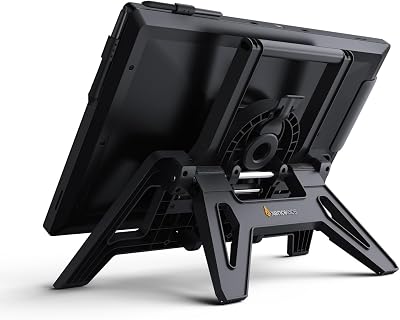
Ergonomic Multi-Axis Stand
The adjustable stand enhances comfort during long drawing sessions, allowing you to position the display at an optimal angle, improving ergonomics and reducing strain on your neck and wrists.
Product Details
| Item Weight | 10.2 lbs (4.63 kg) |
Who Should Buy?

-
Professional Artists
Ideal for professional artists needing high resolution and color accuracy for detailed digital artwork creation.
-
Graphic Designers
Perfect for graphic designers who rely on vibrant colors and precise control for logo and branding projects.
-
Animation Studios
Beneficial for animation studios requiring responsive and versatile tools for creating intricate animations and storyboards.

-
Casual Users
Not suitable for casual users who may not require high-end features or specialized graphics capabilities.
-
Budget-Conscious Buyers
May not fit budget-conscious buyers looking for low-cost, basic drawing solutions without advanced features.
-
Traditional Artists
Traditional artists may prefer conventional media and tools over digital displays, making this product less appealing.
Product Description
Xencelabs Pen Display 24 with Multi-Axis Stand, 4K Drawing Monitor with Quick Keys, 99% Adobe RGB Graphic Drawing Display
Have any Query? Chat with us
Customer Questions & Answers
-
Question:
What are the key features of the Xencelabs Pen Display 24?
Answer: The Xencelabs Pen Display 24 boasts a 4K resolution, providing stunning detail and clarity for your designs. With a multi-axis stand, it allows for versatile positioning, ensuring comfort during long working sessions. The Quick Keys feature enhances your workflow, allowing you to customize shortcuts for your most-used functions, thereby increasing productivity. Its 99% Adobe RGB color coverage ensures that your artwork reflects true-to-life colors, making it a favorite among graphic designers and illustrators. -
Question:
Is the Xencelabs Pen Display 24 compatible with different operating systems?
Answer: Yes, the Xencelabs Pen Display 24 is compatible with various operating systems, including Windows and macOS. This versatility makes it an optimal choice for artists and designers who work across different platforms. You can seamlessly integrate it into your existing setup, whether you're using it for digital painting, 3D modeling, or graphic design, empowering creatives to work without limitations. -
Question:
How does the pen performance compare to other drawing tablets?
Answer: The pen performance of the Xencelabs Pen Display 24 is exceptional, featuring a high level of pressure sensitivity that closely mimics traditional drawing. This results in a more natural and fluid drawing experience, making it suitable for intricate artwork. Your strokes appear responsive and precise on the 4K display, ensuring that every detail of your vision is captured accurately, whether you're sketching, inking, or painting. -
Question:
Can I use the Xencelabs Pen Display 24 for photo editing?
Answer: Absolutely! The Xencelabs Pen Display 24 is an excellent tool for photo editing. Its 99% Adobe RGB coverage and 4K resolution provide accurate color representation, crucial for retouching photos. Graphic designers and photographers can enhance their workflows by utilizing the customizable Quick Keys for shortcuts, speeding up tasks such as layering, masking, and adjusting color settings, thus making it an ideal choice for any photo editing software. -
Question:
What types of creatives benefit most from using the Xencelabs Pen Display 24?
Answer: The Xencelabs Pen Display 24 is ideal for a wide range of creatives, including illustrators, graphic designers, animators, and photographers. Its large screen and stunning display quality create an immersive experience, allowing artists to fully engage with their work. Professionals in animation can benefit from the smooth performance and precision, making it easy to bring their ideas to life, while designers can create without compromising on color accuracy. -
Question:
Does the pen display support touch functionality?
Answer: The Xencelabs Pen Display 24 does not offer touch functionality, focusing instead on delivering an exceptional drawing experience through its pen. This design choice allows for a more precise and controlled drawing, eliminating the potential distractions that touch functionality might introduce. Artists can enjoy uninterrupted creativity as they work exclusively with the pen for sketching and painting. -
Question:
How portable is the Xencelabs Pen Display 24 for traveling artists?
Answer: The Xencelabs Pen Display 24 is a bit larger and heavier than smaller portable tablets, but its robust design makes it suitable for studio use rather than regular travel. For traveling artists, it can be set up in various environments, such as coffee shops or galleries, allowing you to showcase your work easily. Consider pairing it with a carrying case for added protection during the transit to ensure it remains safe. -
Question:
What accessories come with the Xencelabs Pen Display 24?
Answer: The Xencelabs Pen Display 24 comes bundled with several essential accessories, including a stylus, a multi-angle stand, and a set of customizable Quick Keys. This ensures that you’re ready to start creating right out of the box. The accessories enhance user experience, allowing for an ergonomic setup and fast access to frequently used tools, making it a comprehensive choice for both beginners and advanced users. -
Question:
What is the ideal use case for the Quick Keys feature?
Answer: The Quick Keys feature of the Xencelabs Pen Display 24 is designed to streamline your workflow. You can program these keys to access essential tools or commands quickly, such as undo, redo, or zoom in/out functions. This feature is particularly beneficial for graphic designers and illustrators, where efficiency is essential during long projects to prevent repetitive motions and enhance productivity. -
Question:
Where can I buy the Xencelabs Pen Display 24 in Australia?
Answer: You can purchase the Xencelabs Pen Display 24 from Ubuy in Australia. Ubuy offers a convenient online shopping experience with a variety of options for all your creative technology needs, ensuring you have access to high-quality equipment like this exceptional pen display. Check their website for availability and options tailored to your needs.
XENCELABS Graphics Tablets Editorial Review
No editorial reviews found
Customer Reviews & Ratings
1 customers ratings
-
5 Star
100%
-
4 Star
0%
-
3 Star
0%
-
2 Star
0%
-
1 Star
0%
Review this product
Share your thoughts with other customers
Platform Trust & Buyer Confidence

JB
Jane
Verified buyer
“Great continuous communication. Packaged well. Arrived promptly.”
12 June 2026 · via Trustpilot
MM
MAV MTBLife
Verified buyer
“1st buy, Ubuy. Shopping made easy if you don't mind the international shipping cost. Bought the product I wanted and the shipping was fast. I look forward for next shopping☺️”
10 June 2026 · via Trustpilot
AP
amanda
Verified buyer
“Great communication, prompt delivery.”
7 June 2026 · via Trustpilot
DD
Disa
Verified buyer
“I'm getting used to an excellent buyer experience with Ubuy and have begun to rely on them for any purchases I make in the US.”
5 June 2026 · via Trustpilot
KB
Katie
Verified buyer
“Delivery was prompt, with many updates along the way.”
23 May 2026 · via Trustpilot
Secure Checkout
Global Delivery
Easy Returns
Genuine Products
Product Price History
Important information
- Limitations : For products shipped internationally, please note that any manufacturer warranty may not be valid; manufacturer service options may not be available; product manuals, instructions, and safety warnings may not be in destination country languages; the products (and accompanying materials) may not be designed in accordance with destination country standards, specifications, and labeling requirements; and the products may not conform to destination country voltage and other electrical standards (requiring use of an adapter or converter if appropriate). The recipient is responsible for assuring that the product can be lawfully imported to the destination country. When ordering from Ubuy or its affiliates, the recipient is the importer of record and must comply with all laws and regulations of the destination country.
- Not all the products listed on Ubuy are for sale, as Ubuy is a global search engine. Products are subject to export/trade regulations.
Currently unavailable.
We don't know when or if this item will be back in stock.
This item is not restrict in my country.(Please click on above link if this item is not restrict in your country, So our team will review and allow.)
Secured transaction
PCI DSS compliant and ISO 27001:2022 certified, with encrypted payments and full buyer protection on every order.
Our Top Logistics Partners
Fastest cross-border delivery
Features & Benefits
- Large 24-inch drawing screen designed for creative professionals.
- Exceptional glare reduction and superior clarity in bright environments.
- 4K UHD display with stunning color performance and hardware calibration.
- Two battery-free pens with advanced features like 8192 levels of pressure sensitivity.
- Ergonomic design for comfort during long hours of use.
- Integrated shortcut keys for enhanced productivity and workflow.
Ubuy Assurance
Experience worry-free shopping with 100% original products, PCI DSS-compliant payment security, ISO 27001-certified data protection, the fastest cross-border delivery, free returns *, and secure packaging on every order.