0 ratings







Item #:
100415676
Kensington SD5000T5 Thunderbolt 5 Docking Station (K35201NA) Silver | Dual 6K at 60Hz displays, 140W power delivery, compatible with MacBook M1-M5
Item #:
100415676
AUD 449
Price Details
Excluding Shipping & Custom charges ( Shipping and custom charges will be calculated on checkout )
*All items will import from US
8%
Afterpay Information

Split your bill into 4 payments of AUD 112.25 interest-free
 Add the item to your cart
 Select Afterpay at checkout
 Fill in your details
 Complete your first payment
and pay the remaining in easy instalments or according to the payment plan you selected
Here’s why you should Afterpay it

Get everything you need now..
Shop thousands of brands and millions of products, online and in-store.

Pay over six weeks.
Make the first payment upfront and the rest over time. Always interest-free when you pay it in 4.

No fees when you pay on time.
We’ll send you reminders and cap late payments to help you get back on track.
(1) Terms and conditions. apply. (2) Installment Agreement. (3) Eligible for customers in. Australia, (4) Your final payment plan may vary depending on your credit history.
In stock
 Imported from USA store
QTY:
Order now and get it around Wednesday, August 05
Secured transaction
Ubuy works hard to protect your security and privacy. Our advanced payment security system ensures confidentiality by encrypting your information during transmission using AES (Advanced Encryption Standards) and SSL (Secure Socket Layer) protocols. Your payment details are 100% secure as we do not share your payment details with third party sellers.
Our Top Logistics Partners


Experience lightning-fast data transfers with the Kensington SD5000T5 Thunderbolt 5 Docking Station, designed for ultimate connectivity and performance.

Buy Now Pay Later

Fast
Shipping

Free
Return*

Secure Packaging

100% Original Products

PCI DSS Compliance

ISO 27001 Certified


Note: Step Down Voltage Transformer required for using electronics products of US store (110-120). Recommended power converters Buy Now.


What Stands Out
Dual & Triple Display
Supports dual display for MacBooks and triple display for Windows, enhancing productivity by allowing multiple applications to be viewed simultaneously, catering to diverse user needs.
High Power Delivery
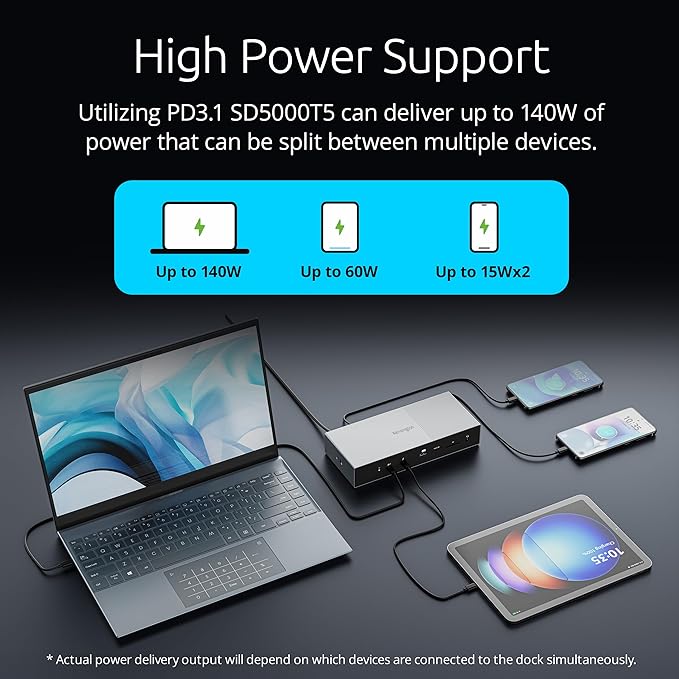
Provides 140W power delivery, ensuring your devices charge quickly while connected, minimizing downtime and maximizing efficiency for power users.
Future-Proof Compatibility
Compatible with Thunderbolt 5 and Thunderbolt 4, ensuring longevity and versatility as technology advances, making it a smart investment for tech-savvy consumers.
Product Details
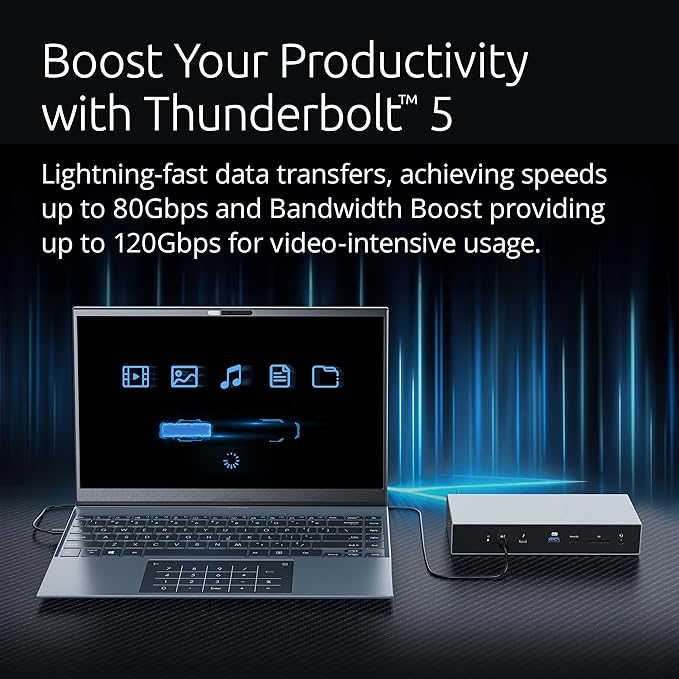
- Thunderbolt 5 dock offers lightning-fast data transfers, achieving speeds up to 80Gbps and Bandwidth Boost providing up to 120Gbps for video-intensive usage
- Dual 6K @ 60Hz for MacBooks with M4/M5 Base, M1/M2/M3/M4 Pro, and M1/M2/M3/M4 Max chipsets; Single 8K @ 60Hz for M4/M5 Base; Single 6K @ 60Hz for M1/M2/M3 Base chipsets; Dual 4K @ 60Hz for Windows Thunderbolt 4; and Triple 4K @ 144Hz or Dual 8K @ 60Hz for Windows Thunderbolt 5 laptops
- Up to 140W Power Delivery ensures seamless power and connectivity
- 3 x Thunderbolt 5 downstream ports, 1 x Thunderbolt 5 host, 3 x USB-A 3.2 Gen2 10Gbps ports, a combo audio jack, dual SD/Micro Card readers, and 2.5Gbps ethernet
- UHS-II SD and Micro SD card readers
- Plug-and-play solution for Thunderbolt 5, Thunderbolt 4, USB4, and USB-C devices running Windows 11 (23H2 or later) or macOS (14.5 or later)
- Zero-Footprint Mounting Option and Security Cable Lock Slots - Maximize desktop space by mounting your docking station out of the way; mounting bracket sold separately (K34050WW). Protect your investment with a Kensington cable lock K60603WW, sold separately
- Composed of 100% post-consumer recycled (PCR) aluminum*– and delivered in Forest Stewardship Council (FSC) certified packaging. *The outer casing of the docking station is made of aluminum
- For MacBook, the number of displays that can be connected through the dock is up to two external displays based on our current testing. With chipsets like M4 Max, you can maximize the display support offered by the CPU by connecting additional monitors directly to the MacBook
| Hardware Interface | Ethernet, MicroSD, Thunderbolt, USB, USB Type C |
| Compatible Devices | Laptops, MacBooks M1/M2/M3/M4 Pro and Max, and M4 Base |
| Total Usb Ports | 3 |
| Number of Ports | 11 |
| Wattage | 180 |
| Minimum Required Operating System Version | Windows 11 |
| Smart Home Compatibility | Not Smart Home Compatible |
| Item Dimensions L x W x H | 8.89"L x 3.82"W x 1.57"H (22.6 x 9.7 x 4 cm) |
| Item Weight | 2.15 Pounds (980 grams) |
| Color | Silver |
| Brand | Kensington |
| UPC | 085896352013 |
| Manufacturer | Kensington |
| Model Number | SD5000T5 |
| Mfr Part Number | K35201NA |
| Built-In Media | Item |
| Total USB Ports | 3 |
| Product Dimensions (L x W x H) | 8.89"L x 3.82"W x 1.57"H (22.6 x 9.7 x 4 cm) |
| Number of Items | 1 |
What's in the box
Item
Who Should Buy?

-
Creative Professionals
Ideal for designers and video editors needing dual or triple displays for enhanced multitasking capabilities.
-
Gaming Enthusiasts
Supports multiple displays with high power delivery, making it suitable for gamers requiring seamless performance.
-
Office Users
Perfect for professionals who want to connect multiple peripherals and expand their workspace efficiently.

-
Casual Users
Basic users who do not utilize multiple displays or high power devices may find it unnecessary.
Product Description
Have any Query? Chat with us
Customer Questions & Answers
-
Question:
What are the main features of the Kensington SD5000T5 Thunderbolt 5 Docking Station?
Answer: The Kensington SD5000T5 Docking Station supports dual display for MacBooks M1, M2, M3, M4 models and can connect to three displays for Windows TB5 users. It is equipped with various ports including USB-C, USB-A, HDMI, and Ethernet, enhancing flexibility for connecting multiple devices. It is ideal for users who multitask or require high-resolution setups, such as graphic designers or gamers, allowing them to extend their workspace efficiently. -
Question:
Is the Kensington SD5000T5 compatible with Thunderbolt 4 devices?
Answer: Yes, the Kensington SD5000T5 Docking Station is fully compatible with Thunderbolt 4 devices. This compatibility means that users can take advantage of the dock's high data transfer rates and power delivery features, regardless of whether they are using Thunderbolt 5 or Thunderbolt 4. It empowers users to connect modern laptops seamlessly, enhancing their productivity by allowing multiple peripherals to connect at once. -
Question:
Can I connect dual displays to my MacBook using the Kensington SD5000T5?
Answer: Absolutely! The Kensington SD5000T5 Docking Station is designed to support dual display for MacBooks M1, M2, M3, and M4 models. This allows Mac users to extend their screen space, making it perfect for tasks that require multiple applications to be open simultaneously. For example, a content creator can edit videos on one screen while keeping reference materials on another, boosting workflow efficiency. -
Question:
What type of users would benefit the most from the Kensington SD5000T5 Docking Station?
Answer: The Kensington SD5000T5 is ideal for professionals, such as graphic designers, video editors, and software developers, who utilize multiple displays for improved productivity. It's also beneficial for everyday users who wish to organize their workspace by connecting peripherals like keyboards, mice, and external storage while maintaining a clutter-free desk. Additionally, it is a smart investment for remote workers needing consistent access to a versatile setup without compromising performance. -
Question:
How does the Kensington SD5000T5 enhance connectivity for users?
Answer: The Kensington SD5000T5 Docking Station enhances connectivity by providing a centralized hub for various devices. With multiple USB-C, USB-A, HDMI, and Ethernet ports, users can simultaneously connect a wide range of peripherals without the hassle of changing cables. This is particularly useful in office environments or at home, where you might need to switch between work and leisure setups without dealing with multiple cords. -
Question:
What resolutions are supported by the Kensington SD5000T5 when using multiple displays?
Answer: When utilizing multiple displays, the Kensington SD5000T5 Docking Station can support high resolutions, with dual displays up to 4K at 60Hz for Mac users and three displays at various resolutions for Windows TB5 users. This capability is critical for professionals who require crisp image quality, such as video editors or designers working with detailed images, ensuring that every pixel is sharp and clear. -
Question:
Does the Kensington SD5000T5 require any drivers for setup?
Answer: The Kensington SD5000T5 Docking Station is designed to be plug-and-play, meaning that most users will not need to install additional drivers for basic functionality. This makes it hassle-free to set up and start using immediately. However, for certain advanced features or optimizations, checking for firmware updates via Kensington's website may be beneficial to ensure peak performance. -
Question:
What is the power delivery capability of the Kensington SD5000T5?
Answer: The Kensington SD5000T5 Docking Station provides robust power delivery capabilities, allowing you to power up your connected laptop while using the dock. It typically delivers sufficient wattage to charge devices, ensuring that your equipment remains charged throughout your workday. This is particularly useful when using it in conjunction with high-performance laptops that drain battery quickly during intensive tasks. -
Question:
How does the Kensington SD5000T5 compare to other docking stations on the market?
Answer: The Kensington SD5000T5 stands out due to its Thunderbolt 5 capabilities, supporting multiple displays and extensive connectivity options. While other docking stations may offer similar features, the ability to switch seamlessly between Mac and Windows setups, along with its efficiency in accommodating high-resolution displays, places it ahead in usability and flexibility for a variety of users and use cases. -
Question:
Where can I buy the Kensington SD5000T5 Thunderbolt 5 Docking Station in Australia?
Answer: You can purchase the Kensington SD5000T5 Thunderbolt 5 Docking Station exclusively from Ubuy. Ubuy offers a great range of tech products and ensures that you can find the necessary accessories for your devices with ease. Whether you're upgrading your workspace or enhancing your tech setup, Ubuy is the recommended platform for acquiring this docking station in Australia.
Kensington Docking Stations SD5000T5 Editorial Review


No editorial reviews found
Customer Reviews & Ratings
60 customers ratings
-
5 Star
41%
-
4 Star
14%
-
3 Star
21%
-
2 Star
5%
-
1 Star
19%
Review this product
Share your thoughts with other customers
Platform Trust & Buyer Confidence

CJ
Chris
Verified buyer
“Promt delivery. Seems like a good product.”
22 July 2026 · via Trustpilot
SM
Scott
Verified buyer
“It was the best service ever received by any company from my online shopping experience in the last 10yrs”
11 July 2026 · via Trustpilot
TD
Terri
Verified buyer
“so easy to order delivery was way earlier than i expected”
3 July 2026 · via Trustpilot
GC
Gavin
Verified buyer
“Very impressed with the speed at which I received my package from the United States to Australia. Highly recommended.”
21-Jul-26 · via Trustpilot
J
Jeannie
Verified buyer
“Very efficient service. Hassle-free. Excellent product. Have ordered several times.”
17-Jul-26 · via Trustpilot
Secure Checkout
Global Delivery
Easy Returns
Genuine Products
Product Price History
Important information
- Limitations : For products shipped internationally, please note that any manufacturer warranty may not be valid; manufacturer service options may not be available; product manuals, instructions, and safety warnings may not be in destination country languages; the products (and accompanying materials) may not be designed in accordance with destination country standards, specifications, and labeling requirements; and the products may not conform to destination country voltage and other electrical standards (requiring use of an adapter or converter if appropriate). The recipient is responsible for assuring that the product can be lawfully imported to the destination country. When ordering from Ubuy or its affiliates, the recipient is the importer of record and must comply with all laws and regulations of the destination country.
- Not all the products listed on Ubuy are for sale, as Ubuy is a global search engine. Products are subject to export/trade regulations.
AUD 449
Order now and get it around Wednesday, August 05
This item is not restrict in my country.(Please click on above link if this item is not restrict in your country, So our team will review and allow.)
QTY:
Secured transaction
PCI DSS compliant and ISO 27001:2022 certified, with encrypted payments and full buyer protection on every order.
Our Top Logistics Partners
Fastest cross-border delivery
Features & Benefits
- Achieves speeds up to 80Gbps and 120Gbps for video-intensive tasks.
- Supports dual 6K @ 60Hz for MacBooks and multiple display configurations for Windows.
- Provides up to 140W Power Delivery for seamless device charging.
- Features multiple ports including Thunderbolt 5, USB-A, audio jack, and dual SD readers.
- Plug-and-play compatibility with Thunderbolt 5, 4, USB4, and USB-C devices.
- Made from 100% post-consumer recycled aluminum, ensuring eco-friendliness.
Ubuy Assurance
Experience worry-free shopping with 100% original products, PCI DSS-compliant payment security, ISO 27001-certified data protection, the fastest cross-border delivery, free returns *, and secure packaging on every order.