- Home Page /
- Electronics /
- Computer Accessories /
- Computer Components /
- Laptop Replacement Parts /
- TLBTEK Backlight Keyboard Replacement Compati...
0 ratings




Item #:
96366874
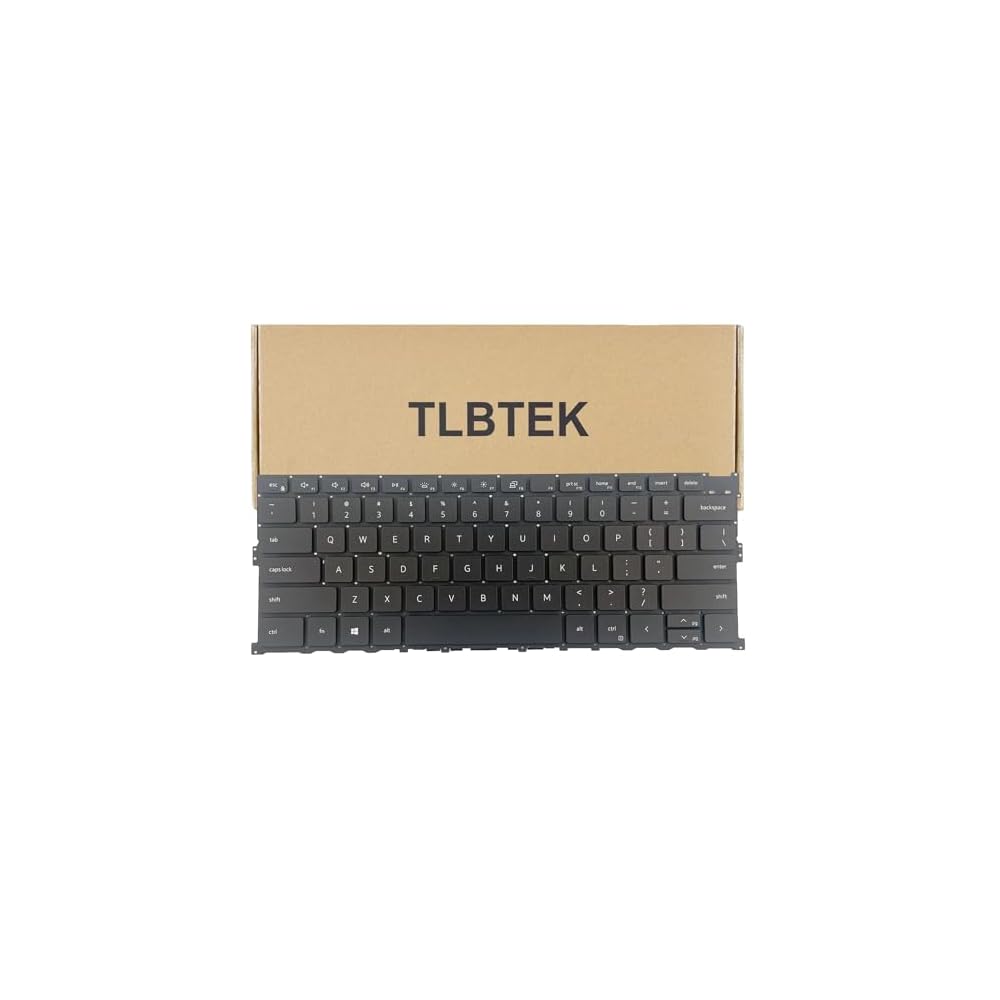
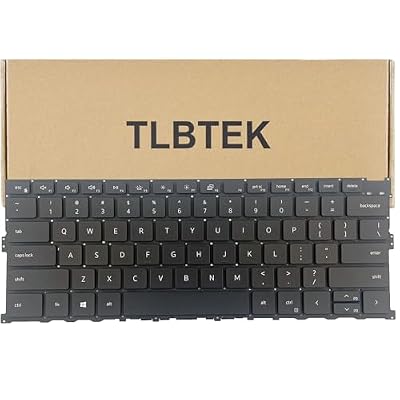
TLBTEK Backlight Keyboard Replacement Compatible with Dell XPS 13 9300 9310 Series Laptop P117G 0Y78C
Item #:
96366874
AUD 69
Price Details
Excluding Shipping & Custom charges ( Shipping and custom charges will be calculated on checkout )
*All items will import from US
Afterpay Information

Split your bill into 4 payments of AUD 17.25 interest-free
 Add the item to your cart
 Select Afterpay at checkout
 Fill in your details
 Complete your first payment
and pay the remaining in easy instalments or according to the payment plan you selected
Here’s why you should Afterpay it

Get everything you need now..
Shop thousands of brands and millions of products, online and in-store.

Pay over six weeks.
Make the first payment upfront and the rest over time. Always interest-free when you pay it in 4.

No fees when you pay on time.
We’ll send you reminders and cap late payments to help you get back on track.
(1) Terms and conditions. apply. (2) Installment Agreement. (3) Eligible for customers in. Australia, (4) Your final payment plan may vary depending on your credit history.
0 ratings
Write a review
In stock
 Imported from USA store
QTY:
Order now and get it around Wednesday, June 24
Secured transaction
Ubuy works hard to protect your security and privacy. Our advanced payment security system ensures confidentiality by encrypting your information during transmission using AES (Advanced Encryption Standards) and SSL (Secure Socket Layer) protocols. Your payment details are 100% secure as we do not share your payment details with third party sellers.
Our Top Logistics Partners


Restore functionality of damaged or unresponsive keys and improve typing speed and accuracy.

Buy Now Pay Later

Fast
Shipping

Free
Return*

Secure Packaging

100% Original Products

PCI DSS Compliance

ISO 27001 Certified


Note: Step Down Voltage Transformer required for using electronics products of US store (110-120). Recommended power converters Buy Now.


What Stands Out
Exact Compatibility
Designed specifically for Dell XPS 13 9300 and 9310 models, ensuring perfect fit and function for hassle-free installation and reliable performance.
High Durability
Crafted from premium materials, this keyboard replacement withstands daily wear and tear, providing longevity and a comfortable typing experience for extended use.
Easy Installation
Comes with all necessary components for straightforward installation, allowing users to replace their keyboard quickly without professional assistance, saving time and money.
Product Details
- 【Compatible Models】Compatible with Dell XPS 13 9300 9310 Series Laptop P117G 0Y78C
- 【Specification】This keyboard is with backlight.
- 【Good Package】This keyboard is covered bubble bag in box,make sure you can receive a high quality keyboard.
- 【Solution of keys don't work】If some keys don't work after install ,You can try to reconnect the ribbon cable in case bad connected ,pls use a dry cloth to wipe metal head of the connect ribbon,then try to connect about few times,many customer solve this problem after did this.
| Compatible Devices | Laptop |
| Connectivity Technology | cable |
| Additional Features | Backlit |
| Keyboard Backlighting Color Support | Single Color |
| Power Source | USB Powered |
| Switch Type | Mechanical |
| Keyboard Layout | QWERTY |
| Hand Orientation | Ambidextrous |
| Button Quantity | 1 |
| Water Resistance Level | Not Water Resistant |
| Number of Keys | 1 |
| Number of Sections | 1 |
| Enclosure Material | Plastic |
| Brand | TLBTEK |
| Keyboard Description | this laptop keyboard with backlight |
| Antenna Location | Office |
| Model Number | 0038ca44-0998-46ff-90e2-368ed0ad92ac |
| Unit Count | 1.0 Count |
| Manufacturer | TLBTEK |
| Color | Black |
| Style Name | Modern |
| Recommended Uses For Product | Office |
| Special Feature | Backlit |
| Keyboard backlighting color support | Single Color |
| Style | Modern |
| Material | Plastic |
| Item Weight | 0.5 lbs (230 grams) |
Who Should Buy?

-
Frequent Travelers
Ideal for users on the move needing a reliable keyboard replacement for sudden malfunctions.
-
DIY Repair Enthusiasts
Perfect for tech-savvy individuals comfortable with laptop disassembly to perform their own repairs.
-
Budget-Conscious Users
Offers an affordable solution for those needing to replace their laptop keyboard without expensive repairs.

-
Non-Technical Users
May be challenging for individuals unfamiliar with laptop hardware who require professional installation.
-
Gaming Enthusiasts
Not suitable for users who prioritize mechanical keyboards with specialized features for gaming performance.
-
Mac Users
Incompatible with Mac laptops as it is specifically designed for Dell XPS 13 series models only.
Product Description
Have any Query? Chat with us
Customer Questions & Answers
-
Question:
What are the compatibility details for the TLBTEK Keyboard Replacement?
Answer: The TLBTEK Keyboard Replacement is specifically designed for the Dell XPS 13 9300 and 9310 series laptops. This means it fits perfectly and aligns with the internal components of these specific models, ensuring a seamless installation. It's crucial to use this particular replacement, as using a non-compatible keyboard can lead to functionality issues, such as misalignment of keys or improper connectivity. If you own a Dell XPS 13 9300 or 9310, this keyboard replacement is an ideal solution to restore your laptop's functionality. -
Question:
Is the installation process for the TLBTEK Keyboard Replacement difficult?
Answer: While the installation of the TLBTEK Keyboard Replacement may seem intimidating, it can be manageable with the right tools and instructions. Typically, it involves removing the laptop’s back cover and disconnecting the old keyboard. Each key is tested for responsiveness post-installation. For those who are tech-savvy or have experience with laptop repairs, this can serve as a rewarding DIY project. Alternatively, you may seek professional assistance for installation. -
Question:
What materials are used in the TLBTEK Keyboard Replacement?
Answer: The TLBTEK Keyboard Replacement is crafted from high-quality materials designed for durability and performance. The keycaps are generally made of sturdy plastic that withstands daily usage while ensuring a comfortable typing experience. Additionally, the internal components are engineered for optimal connectivity with your Dell XPS laptop, allowing for smooth operation. This focus on material quality ensures that users can enjoy a responsive and long-lasting keyboard. -
Question:
Can I replace just one key instead of the entire keyboard?
Answer: While it is possible to replace individual keys, it might be more practical to replace the entire TLBTEK Keyboard Replacement if multiple keys are damaged or unresponsive. Individual key replacements can be tricky and may require precise tools or replacement keys. By opting for an entire keyboard replacement, you ensure that all keys function uniformly and maintain the aesthetics of your laptop. If you have multiple keys that are malfunctioning, consider a full replacement as a cleaner, more reliable solution. -
Question:
Does the TLBTEK Keyboard Replacement come with a backlight feature?
Answer: The TLBTEK Keyboard Replacement compatible with the Dell XPS 13 9300 and 9310 series supports backlighting features provided by the original laptop design. However, always verify the specifications of the keyboard model, as backlighting may depend on your laptop's hardware. If your original keyboard had backlighting, this replacement is designed to retain that feature, enabling you to type effectively in low-light conditions. This makes it an excellent option for users who work in dim environments. -
Question:
What is the difference between a TLBTEK keyboard and an OEM keyboard?
Answer: The main difference between the TLBTEK keyboard and an original equipment manufacturer (OEM) keyboard is typically in cost versus branding. While OEM keyboards may be directly from Dell and might offer a slightly more exact fit, TLBTEK keyboards are engineered to meet or exceed original standards, providing reliable compatibility and performance. Customers often opt for TLBTEK for affordability without sacrificing quality, making it a popular choice for users looking to save cost while maintaining functionality. -
Question:
How does the TLBTEK Keyboard Replacement improve typing experience?
Answer: The TLBTEK Keyboard Replacement significantly enhances the typing experience through its ergonomic design and responsive keys. Users often find that the tactile feedback and key travel are optimized to reduce fatigue during long typing sessions. Furthermore, if your previous keyboard had worn out keys or sticky spots, replacing it with a new TLBTEK keyboard can restore the pleasure of typing. This improvement is particularly beneficial for students, writers, and professionals who rely heavily on their laptops for writing tasks. -
Question:
Where can I get support or reviews for the TLBTEK Keyboard Replacement?
Answer: For support or reviews, you can check online marketplaces or dedicated tech forums. Many users share their experiences with the TLBTEK Keyboard Replacement, which can provide insights into performance and reliability. Additionally, YouTube tutorials can offer visual guidance for installation and troubleshooting. Engaging with the community can also help clarify any doubts about the compatibility and performance of the keyboard replacement, making your buying decision more informed. -
Question:
Is the TLBTEK Keyboard Replacement waterproof or spill-resistant?
Answer: The TLBTEK Keyboard Replacement itself does not inherently have waterproof or spill-resistant features. However, it is designed to cope with normal use, so minor spills might not immediately damage it. It is advisable to keep liquids away from the keyboard to avoid potential malfunctions. For enhanced protection, consider using keyboard covers that provide waterproofing while allowing you to maintain the quality of your keyboard over time. -
Question:
Where can I buy TLBTEK Keyboard Replacement Compatible with Dell XPS 13 9300 9310 Series Laptop?
Answer: You can purchase the TLBTEK Keyboard Replacement compatible with Dell XPS 13 9300 and 9310 series laptops from Ubuy in Australia. Ubuy is a trusted online shopping platform that offers a wide array of electronic accessories and replacements, including this specific keyboard. Shopping through Ubuy ensures you are getting a reliable product tailored for your laptop's needs, and it also provides a straightforward purchasing experience with straightforward navigation through tech products.
TLBTEK Laptop Replacement Parts 0038ca44-0998-46ff-90e2-368ed0ad92ac Editorial Review
No editorial reviews found
Customer Reviews & Ratings
1 customers ratings
-
5 Star
100%
-
4 Star
0%
-
3 Star
0%
-
2 Star
0%
-
1 Star
0%
Review this product
Share your thoughts with other customers
Pros
- Easy to install
- Perfect fit for XPS 13
- High-quality materials
- Responsive keys
- Great typing experience
Cons
- A bit heavier than expected.
Product Price History
Important information
- Limitations : For products shipped internationally, please note that any manufacturer warranty may not be valid; manufacturer service options may not be available; product manuals, instructions, and safety warnings may not be in destination country languages; the products (and accompanying materials) may not be designed in accordance with destination country standards, specifications, and labeling requirements; and the products may not conform to destination country voltage and other electrical standards (requiring use of an adapter or converter if appropriate). The recipient is responsible for assuring that the product can be lawfully imported to the destination country. When ordering from Ubuy or its affiliates, the recipient is the importer of record and must comply with all laws and regulations of the destination country.
- Not all the products listed on Ubuy are for sale, as Ubuy is a global search engine. Products are subject to export/trade regulations.
AUD 69
Order now and get it around Wednesday, June 24
This item is not restrict in my country.(Please click on above link if this item is not restrict in your country, So our team will review and allow.)
QTY:
Secured transaction
Ubuy works hard to protect your security and privacy. Our advanced payment security system ensures confidentiality by encrypting your information during transmission using AES (Advanced Encryption Standards) and SSL (Secure Socket Layer) protocols. Your payment details are 100% secure as we do not share your payment details with third party sellers.
Our Top Logistics Partners
Fastest cross-border delivery
Features & Benefits
- Revive broken or unresponsive keys.
- Enhance your typing speed and accuracy.
- Prevent further laptop damage from spills and debris.
- Extend the lifespan of your laptop.
- Compatible with Dell XPS 13 9300 and 9310 Series.
- Safe and durable packaging to avoid damage during shipping.