0 ratings

Item #:
87168133
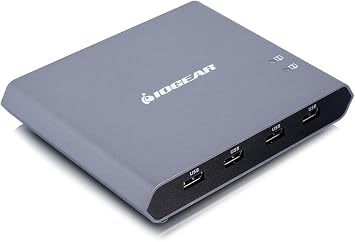
IOGEAR 2-Port 4K USB-C Desktop KVM with DISPLAYPORT Output and USB Peripheral
Item #:
87168133
AUD 269
Price Details
Excluding Shipping & Custom charges ( Shipping and custom charges will be calculated on checkout )
*All items will import from US
Afterpay Information

Split your bill into 4 payments of AUD 67.25 interest-free
 Add the item to your cart
 Select Afterpay at checkout
 Fill in your details
 Complete your first payment
and pay the remaining in easy instalments or according to the payment plan you selected
Here’s why you should Afterpay it

Get everything you need now..
Shop thousands of brands and millions of products, online and in-store.

Pay over six weeks.
Make the first payment upfront and the rest over time. Always interest-free when you pay it in 4.

No fees when you pay on time.
We’ll send you reminders and cap late payments to help you get back on track.
(1) Terms and conditions. apply. (2) Installment Agreement. (3) Eligible for customers in. Australia, (4) Your final payment plan may vary depending on your credit history.
0 ratings
Write a review
In stock
 Imported from USA store
QTY:
Order now and get it around Monday, July 06
Secured transaction
Ubuy works hard to protect your security and privacy. Our advanced payment security system ensures confidentiality by encrypting your information during transmission using AES (Advanced Encryption Standards) and SSL (Secure Socket Layer) protocols. Your payment details are 100% secure as we do not share your payment details with third party sellers.
Our Top Logistics Partners


Switch and manage two USB-C devices in one display with one click!

Buy Now Pay Later

Fast
Shipping

Free
Return*

Secure Packaging

100% Original Products

PCI DSS Compliance

ISO 27001 Certified


Note: Step Down Voltage Transformer required for using electronics products of US store (110-120). Recommended power converters Buy Now.


What Stands Out
Multi-Device Switching
Seamlessly switch between two computers using the IOGEAR Access Pro Plus, enhancing productivity for users operating both Windows and Mac systems without swapping cables.
4K Resolution Support
Enjoy stunning visuals with 4K 60Hz display output, ensuring crystal-clear images for gaming or professional use, making it ideal for creatives who demand high-quality graphic performance.
Integrated USB Hub
The built-in 4-port USB hub allows easy peripheral connectivity, empowering users to connect multiple devices effortlessly, thus streamlining workflow and reducing clutter on their workspace.
Product Details
| Item Weight | 1.5 lbs (680 grams) |
Who Should Buy?

-
Dual System Users
Ideal for users who operate both Windows and Mac systems and want seamless switching between devices.
-
Graphic Professionals
Perfect for designers or video editors needing high-resolution 4K output for accurate visual work.
-
USB Hub Needs
Beneficial for users requiring additional USB ports for peripherals while managing multiple devices.

-
Single Device Users
Not suitable for individuals who only use one computer, as features may go underutilized.
-
Budget-Conscious Buyers
May not be ideal for those seeking cost-effective solutions, as this KVM switch is relatively premium-priced.
-
Basic Users
Not recommended for casual users with limited technical needs, as advanced features may be unnecessary.
Product Description
IOGEAR 2-Port 4K USB-C Desktop KVM with DISPLAYPORT Output and USB Peripheral
Have any Query? Chat with us
Customer Questions & Answers
-
Question:
What is the main functionality of the IOGEAR Access Pro Plus 2-Port USB-C Desktop KVM Switch?
Answer: The IOGEAR Access Pro Plus 2-Port USB-C Desktop KVM Switch allows users to control two different devices from a single desktop setup. It enables seamless switching between the devices with just a press of a button, making it ideal for users who need to operate multiple machines efficiently. This device is particularly useful in work environments where multitasking is essential, such as graphic design, software development, or gaming setups. -
Question:
How does the 4K 60Hz DP output enhance my viewing experience?
Answer: The 4K 60Hz DisplayPort output ensures stunning visuals with crisp clarity and vibrant colors, ideal for high-definition gaming, video editing, and content creation. This technology allows for smooth frame rates, reducing lag and enhancing the overall performance of video applications. Users looking to connect to ultra-high-definition displays will appreciate the immersive experience that this KVM switch provides, making it perfect for professionals and entertainment enthusiasts alike. -
Question:
What types of devices can I connect to the KVM switch?
Answer: The IOGEAR Access Pro Plus KVM switch is compatible with a wide range of devices including laptops, desktops, and tablets that utilize USB-C connections. Additionally, devices equipped with DisplayPort outputs can leverage the 4K capabilities of the KVM switch. This versatility makes it a great addition to both home and office setups, allowing users to switch between work and personal devices with ease. -
Question:
What is the function of the 4X USB Hub on the KVM switch?
Answer: The 4X USB Hub on the IOGEAR Access Pro Plus KVM Switch allows users to connect up to four additional USB devices like keyboards, mice, external drives, or printers simultaneously. This feature enhances the functionality of your setup by providing multiple USB ports for peripherals, helping to keep your workspace organized and efficient while reducing the need for constant plugging and unplugging. -
Question:
Can I use this KVM switch with devices that have different operating systems?
Answer: Yes, the IOGEAR Access Pro Plus KVM Switch is designed to work with different operating systems, including Windows, macOS, and Linux. This cross-compatibility allows users with diverse system preferences to benefit from a unified control method. It is particularly useful in environments where multiple operating systems are used, such as in tech development or cross-platform tech support scenarios. -
Question:
How is the switching process handled between connected devices?
Answer: Switching between devices connected to the IOGEAR Access Pro Plus KVM Switch is intuitive and efficient. Users can change between devices with a simple press of a button located on the switch itself. This streamlined feature ensures users can quickly transition between tasks without interruption, which is essential for maintaining productivity in a fast-paced work environment. -
Question:
Does the KVM switch support audio output as well?
Answer: Yes, the IOGEAR Access Pro Plus KVM Switch supports audio output through its DisplayPort connection, allowing users to enjoy an integrated audio experience alongside video. This is particularly beneficial for users engaged in multimedia tasks, such as video editing or gaming, as it ensures both high-quality visuals and sound can be managed through a single connection point, enhancing the overall experience. -
Question:
Is there a maximum resolution supported by this KVM switch?
Answer: The IOGEAR Access Pro Plus KVM Switch supports resolutions up to 4K at 60Hz, providing exceptional clarity and detail on your display. This high resolution is perfect for graphic designers, video editors, and gamers who require superior visual performance. Users can work on tasks requiring precise detail without compromising on quality or performance, making it a crucial tool for professional use. -
Question:
Where can I buy the IOGEAR Access Pro Plus 2-Port USB-C Desktop KVM Switch in Australia?
Answer: You can purchase the IOGEAR Access Pro Plus 2-Port USB-C Desktop KVM Switch at Ubuy, which offers a convenient shopping platform for this product in Australia. Ubuy provides a straightforward online experience, allowing you to browse, compare, and find this KVM switch efficiently, ensuring you have quick access to its features and specifications while making your purchase. -
Question:
Can the KVM switch be used with multiple monitors?
Answer: This particular model of the IOGEAR Access Pro Plus KVM Switch is designed for use with a single monitor setup, supporting high-definition output. For users looking to set up multiple monitor configurations, exploring dedicated multi-monitor KVM switches would be necessary. However, the devices can still be switched seamlessly for individuals who use different setups at various times, ensuring versatility even if running one display.
IOGEAR KVM Switches Editorial Review
No editorial reviews found
Customer Reviews & Ratings
1 customers ratings
-
5 Star
100%
-
4 Star
0%
-
3 Star
0%
-
2 Star
0%
-
1 Star
0%
Review this product
Share your thoughts with other customers
Product Price History
Important information
- Limitations : For products shipped internationally, please note that any manufacturer warranty may not be valid; manufacturer service options may not be available; product manuals, instructions, and safety warnings may not be in destination country languages; the products (and accompanying materials) may not be designed in accordance with destination country standards, specifications, and labeling requirements; and the products may not conform to destination country voltage and other electrical standards (requiring use of an adapter or converter if appropriate). The recipient is responsible for assuring that the product can be lawfully imported to the destination country. When ordering from Ubuy or its affiliates, the recipient is the importer of record and must comply with all laws and regulations of the destination country.
- Not all the products listed on Ubuy are for sale, as Ubuy is a global search engine. Products are subject to export/trade regulations.
AUD 269
Order now and get it around Monday, July 06
This item is not restrict in my country.(Please click on above link if this item is not restrict in your country, So our team will review and allow.)
QTY:
Secured transaction
Ubuy works hard to protect your security and privacy. Our advanced payment security system ensures confidentiality by encrypting your information during transmission using AES (Advanced Encryption Standards) and SSL (Secure Socket Layer) protocols. Your payment details are 100% secure as we do not share your payment details with third party sellers.
Our Top Logistics Partners
Fastest cross-border delivery
Features & Benefits
- Effortlessly switch between two USB-C devices.
- Maximum desk space with a single connection point.
- Perfect for both Mac and Android users.
- Supports 4K UHD resolution at 60Hz.
- Provides super-fast charging up to 100W.
- Plug-n-Play design requires no additional software.