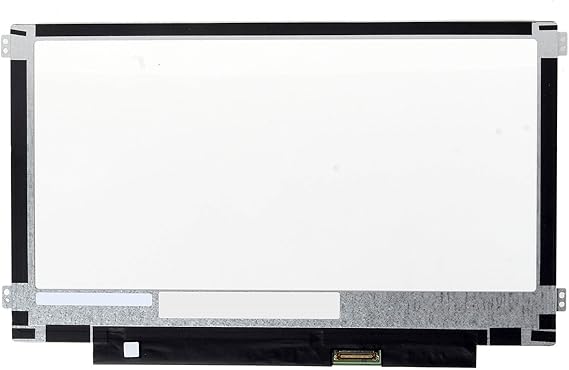
A2337 Screen Replacement A2337 LCD for 13 inches MacBook M1 air 2020 Year 2560x1600 Replacement LCD Full Assembly for EMC 3598 MGN63 Space Gray
AUD 79
Price Details
Excluding Shipping & Custom charges ( Shipping and custom charges will be calculated on checkout )
*All items will import from US
Afterpay Information
Add the item to your cart
Select Afterpay at checkout
Fill in your details
Complete your first payment
and pay the remaining in easy instalments or according to the payment plan you selected
(1) Terms and conditions. apply. (2) Installment Agreement. (3) Eligible for customers in. Australia, (4) Your final payment plan may vary depending on your credit history.
QTY:
Ubuy works hard to protect your security and privacy. Our advanced payment security system ensures confidentiality by encrypting your information during transmission using AES (Advanced Encryption Standards) and SSL (Secure Socket Layer) protocols. Your payment details are 100% secure as we do not share your payment details with third party sellers.
Buy Now Pay Later
Fast
Shipping
Free
Return*
Secure Packaging
100% Original Products
PCI DSS Compliance
ISO 27001 Certified

What Stands Out
Product Details
- 11.6 Replacement LED Screen for Samsung Chromebook 3 XE500C13 Winbook
- Fast and free USPS Priority Mail shipping in the continental US, with shipping available to most countries
- Comes with a free tool kit and instructional video for easy replacement
- Provides free email technical support for installation problems
- Offers easy returns within 30 days and a 2-year warranty for screen quality issues
- Screen specifications: 11.6-inch WideScreen, WXGA HD resolution, LED backlight, glossy finish, Grade A condition
| Country of Origin | This item will be imported from US |
| Date First Available | April 02, 2021 |
| What is in the box | A2337 Screen Replacement A2337... For more details, please check description/product details |
Who Should Buy?
-
DIY Repair Enthusiasts
Ideal for individuals who enjoy fixing their own devices and prefer hands-on repair experiences.
-
Small Business Owners
Beneficial for small businesses requiring quick, cost-effective repairs to maintain productivity and client services.
-
Budget-Conscious Users
Great for users looking to save money on expensive repair services by replacing the screen themselves.
-
Non-Technical Users
Not suitable for users lacking technical skills or comfort with DIY repairs, as installation may be complex.
Product Description
A2337 Screen Replacement A2337 LCD for 13 inches MacBook M1 air 2020 Year 2560x1600 Replacement LCD Full Assembly for EMC 3598 MGN63 Space Gray
Related Searches
Customer Questions & Answers
-
Question:
What are the specifications of the Samsung Chromebook 3 XE500C13 Replacement Screen?
Answer: The Samsung Chromebook 3 XE500C13 Replacement Screen features a 11.6-inch display with a resolution of 1366 x 768 pixels, making it ideal for everyday tasks. It typically uses LED backlighting for brighter visuals and consumes less power. This screen is directly compatible with the original Chromebook 3 model, ensuring a seamless replacement experience. Whether you are a student needing a reliable device for online classes or a professional working remotely, this screen provides clear visuals for browsing, document editing, and streaming. -
Question:
How do I install the Samsung Chromebook 3 XE500C13 Replacement Screen?
Answer: Installing the Samsung Chromebook 3 XE500C13 Replacement Screen can be done by carefully removing the bezel surrounding the existing screen, unscrewing the broken screen, and connecting the new one in its place. It’s important to follow a detailed guide with step-by-step instructions, which can be found in online tutorials. Ensure to handle all components gently to prevent further damage. If you're a DIY enthusiast, this can be a rewarding project, improving your Chromebook's longevity and performance without needing professional help. -
Question:
Is the Samsung Chromebook 3 XE500C13 Replacement Screen easy to find?
Answer: Yes, the Samsung Chromebook 3 XE500C13 Replacement Screen is readily available through various online retailers. Most e-commerce platforms offer this original version, making it easy for anyone needing a screen replacement. The popularity of Chromebook devices ensures that parts like screens are commonly stocked. If you're facing issues with display, investing in a genuine replacement can ensure compatibility and durability, restoring your device efficiently for tasks like schoolwork or entertainment. -
Question:
What should I consider when purchasing a replacement screen?
Answer: When buying a replacement screen for your Samsung Chromebook 3, consider compatibility, quality, and warranty. Ensure that the screen matches the specific model number, such as XE500C13. Look for screens that offer an original manufacturer warranty, which can provide peace of mind. High-quality displays will enhance your viewing experience whether you're watching videos or working on projects, making it essential to choose a trusted supplier to avoid subpar performance. -
Question:
What tools do I need to replace the screen?
Answer: To replace the screen of the Samsung Chromebook 3 XE500C13, you will need a small Phillips screwdriver, a prying tool, and possibly a suction cup tool for bezel removal. These tools allow for safe and effective disassembly of the device without damaging other components. This setup helps you efficiently replace your screen, making the process smoother whether you are at home or want to quickly fix it before an essential meeting. -
Question:
Can I damage my Chromebook if I attempt to change the screen myself?
Answer: Yes, there is a risk of damaging your Chromebook while changing the screen if proper precautions aren’t taken. Be careful to avoid static electricity, which can harm internal components, and ensure that all connections are securely attached. Watching instructional videos can provide valuable guidance. If the process feels daunting, consider seeking professional help. This avoids potential mishaps while ensuring that your device remains functional for your daily activities. -
Question:
Will the Samsung Chromebook 3 XE500C13 Replacement Screen come with installation instructions?
Answer: Typically, the Samsung Chromebook 3 XE500C13 Replacement Screen does not come with detailed installation instructions, as manufacturers assume some level of technical ability. However, many authorized suppliers provide links to video guides or tutorials to help you through the process. Utilizing these resources can empower you to confidently tackle this repair. Whether you’re a tech-savvy individual or simply wish to save on repair costs, having accessible guides can enhance your experience. -
Question:
What is the warranty period for the Samsung Chromebook 3 XE500C13 Replacement Screen?
Answer: Warranty periods for the Samsung Chromebook 3 XE500C13 Replacement Screen may vary based on the retailer but commonly range from 30 days to one year. A warranty is beneficial as it protects against defects in materials and workmanship, allowing you to replace the screen at no additional cost if issues arise. This assurance can be crucial, especially for students or professionals who rely heavily on their devices for studies or work. -
Question:
What is the average lifetime of the replacement screen?
Answer: The average lifetime of the Samsung Chromebook 3 XE500C13 Replacement Screen could be several years, depending on usage patterns and care. Generally, with proper maintenance, screens can last from 3 to 5 years under normal conditions. Engaging in practices like using a screen protector and avoiding excessive pressure can enhance longevity. For users who frequently use their Chromebook for tasks like gaming or graphic work, making sure to maintain the screen can preserve its clarity and functionality. -
Question:
Where can I buy Samsung Chromebook 3 XE500C13 Replacement Screen Original Version?
Answer: You can buy the Samsung Chromebook 3 XE500C13 Replacement Screen Original Version from Ubuy in Australia. Ubuy is a trusted online marketplace that offers a wide range of products, including replacement parts for various devices. With their reliable customer service and convenient shipping options, you can easily find the exact replacement screen you need, ensuring that your Chromebook 3 is up and running smoothly.
JYYSCRN Replacement Screens Editorial Review
Customer Reviews & Ratings
-
5 Star
100%
-
4 Star
0%
-
3 Star
0%
-
2 Star
0%
-
1 Star
0%
Review this product
Share your thoughts with other customers
Platform Trust & Buyer Confidence
“Promt delivery. Seems like a good product.”
“It was the best service ever received by any company from my online shopping experience in the last 10yrs”
“so easy to order delivery was way earlier than i expected”
“Very impressed with the speed at which I received my package from the United States to Australia. Highly recommended.”
“Very efficient service. Hassle-free. Excellent product. Have ordered several times.”
Top selling MacBook Air screen replacement in Australia
Product Price History
Important information
- Limitations : For products shipped internationally, please note that any manufacturer warranty may not be valid; manufacturer service options may not be available; product manuals, instructions, and safety warnings may not be in destination country languages; the products (and accompanying materials) may not be designed in accordance with destination country standards, specifications, and labeling requirements; and the products may not conform to destination country voltage and other electrical standards (requiring use of an adapter or converter if appropriate). The recipient is responsible for assuring that the product can be lawfully imported to the destination country. When ordering from Ubuy or its affiliates, the recipient is the importer of record and must comply with all laws and regulations of the destination country.
- Not all the products listed on Ubuy are for sale, as Ubuy is a global search engine. Products are subject to export/trade regulations.
AUD 79
Order now and get it around Thursday, August 06
This item is not restrict in my country.(Please click on above link if this item is not restrict in your country, So our team will review and allow.)
QTY:
PCI DSS compliant and ISO 27001:2022 certified, with encrypted payments and full buyer protection on every order.
Ubuy Assurance
Experience worry-free shopping with 100% original products, PCI DSS-compliant payment security, ISO 27001-certified data protection, the fastest cross-border delivery, free returns *, and secure packaging on every order.




