- Home Page /
- Electronics /
- Computer Accessories /
- Computer Components /
- Computer Internal Components /
- Internal TV Tuner & Capture Cards /
- Capture Card for Nintendo Switch,USB3.0 1080P...
0 ratings






Item #:
220431162
Capture Card for Nintendo Switch,USB3.0 1080P 60FPS Video Audio Capture Card,Support 4K@30Hz Input and Passthrough for PS4 PS5 DSLR Xbox Streaming
Item #:
220431162
AUD 109
Price Details
Excluding Shipping & Custom charges ( Shipping and custom charges will be calculated on checkout )
*All items will import from US
16%
Afterpay Information

Split your bill into 4 payments of AUD 27.25 interest-free
 Add the item to your cart
 Select Afterpay at checkout
 Fill in your details
 Complete your first payment
and pay the remaining in easy instalments or according to the payment plan you selected
Here’s why you should Afterpay it

Get everything you need now..
Shop thousands of brands and millions of products, online and in-store.

Pay over six weeks.
Make the first payment upfront and the rest over time. Always interest-free when you pay it in 4.

No fees when you pay on time.
We’ll send you reminders and cap late payments to help you get back on track.
(1) Terms and conditions. apply. (2) Installment Agreement. (3) Eligible for customers in. Australia, (4) Your final payment plan may vary depending on your credit history.
In stock
 Imported from USA store
QTY:
Order now and get it around Friday, August 14
Secured transaction
Ubuy works hard to protect your security and privacy. Our advanced payment security system ensures confidentiality by encrypting your information during transmission using AES (Advanced Encryption Standards) and SSL (Secure Socket Layer) protocols. Your payment details are 100% secure as we do not share your payment details with third party sellers.
Our Top Logistics Partners


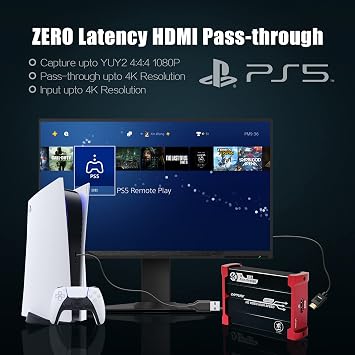
Experience zero latency HDMI loopout with our 4K@30Hz capture card, perfect for game live streaming.

Buy Now Pay Later

Fast
Shipping

Free
Return*

Secure Packaging

100% Original Products

PCI DSS Compliance

ISO 27001 Certified


Note: Step Down Voltage Transformer required for using electronics products of US store (110-120). Recommended power converters Buy Now.


What Stands Out
High-Quality Capture
Delivers stunning 1080P at 60FPS video quality, ensuring your gameplay captures are smooth and visually appealing for streamers using platforms like OBS.
Versatile Compatibility
Supports a wide range of devices including Nintendo Switch, PS4, PS5, and Xbox, making it an ideal choice for gamers across multiple platforms.
Low Latency Passthrough
Offers 4K@30Hz input and passthrough, allowing real-time gameplay viewing without delay, enhancing the streaming experience for both players and audiences.
Product Details
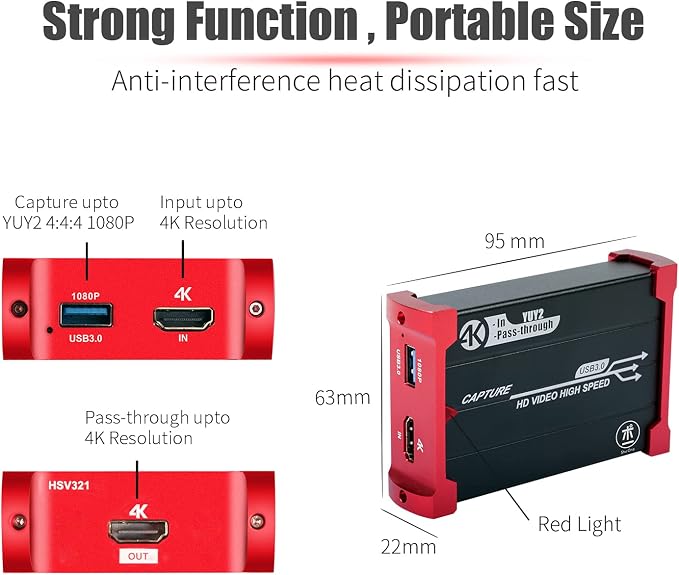
- 【4K@30Hz Input and ZERO Latency 4K@30Hz HDMI Loopout】This capture card support 4K@30Hz input and 4K@30Hz Zero Latency Passthrough, noted: this capture card just support 1080P@60Hz capture, it can not support 4K capture.There is no latency when you use the hdmi loopout port, the hdmi loopout port is very usefully when you are making a game live streaming.
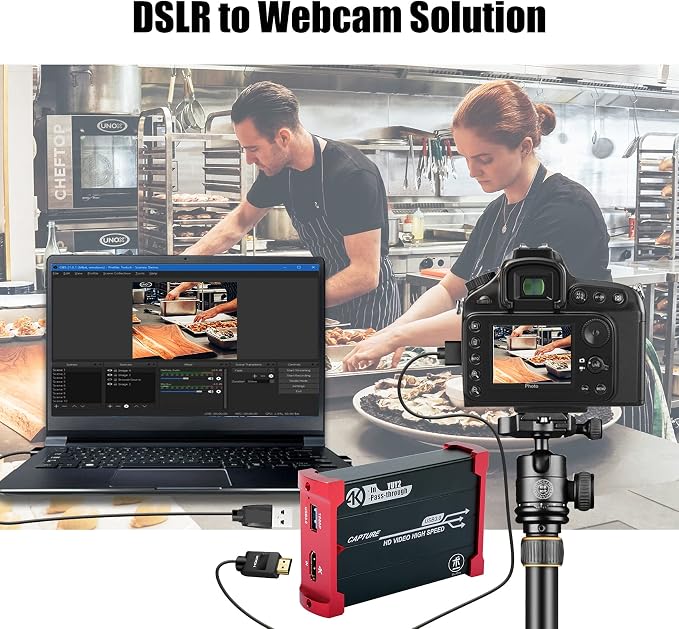
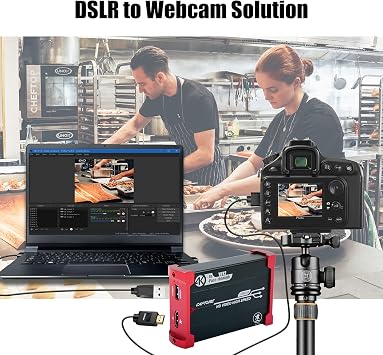
- 【Stronger Compatibility】This 4K hdmi capture card can be compatible with all 4K@30Hz 1080P 720P hdmi device, such as Wii U, PS4, PS3, Xbox One, Xbox 360, Wii, Switch, DVD, camera, ZOSI security camera, DSLR and set top box etc.
- 【USB3.0 YUY2 4:4:4 1080P With 60FPS】The HD video capture card can support 1080P with 60FPS, it is very suitable to use it for game live streaming.
- 【Faster Data Transmition】USB3.0 high speed transmission port,let your live streaming to Twitch, Youtube, OBS, Potplayer and VLC more easily.
- 【Plug and Play,No Need to Install Driver】It is compatible with Linux, Mac OS, windows 7/8/10, very easy to setup, there is no need to install driver.
| Hardware Interface | HDMI, USB 3.0 |
| Video Capture Resolution | 1080p, 720p |
| Operating System | Mac OS X 10.3 Panther, Windows 7/8/10/11 |
| Antenna Location | Image Capture, Video Recording |
| Other Special Features of the Product | Automatically detect the input video formats and automatically just to set output size and frame rate, Support HDCP 1080P/60Hz .It is compatible with UVC video capture and YUV 422 video output . |
| Platform | Nintendo Wii U |
| AV Output | YUY2/MJPEG |
| Compatible Devices | Nintendo Switch, Playstation 4, Xbox One |
| Minimum System Requirements | 4th generation quad‑core Intel Core i5 CPU (i5-4xxx or comparable),Intel HD or NVIDIA GeForce GTX 600 series graphics (or better) |
| Item Weight | 3.7 ounces (104.9 grams) |
| Item Dimensions | 3.74 x 2.48 x 0.87 inches (9.5 x 6.3 x 2.2 cm) |
| Brand | Mirabox |
| Model Name | HSV321 1080P 60FPS HDMI Capture Card |
| Built-In Media | Capture Card, Installation Guide, USB3.0 Cable |
| Model Number | HSV321 |
| Manufacturer | Hotspot Tech |
| Unit Count | 1 Count |
| Mfr Part Number | HSV321 |
| Recommended Uses For Product | Image Capture, Video Recording |
What's in the box
Capture Card
USB3.0 Cable
Installation Guide
Who Should Buy?

-
Content Creators
Ideal for streamers or YouTubers who want to capture high-quality gameplay footage easily.
-
Gamers
Perfect for serious gamers looking to record or stream their gaming sessions in 1080P at 60FPS.
-
Multimedia Professionals
Great for DSLR users and professionals requiring quality video input for presentations or video shoots.

-
Casual Users
Not suitable for casual gamers who do not need advanced capturing features or high resolution.
Product Description
Have any Query? Chat with us
Customer Questions & Answers
-
Question:
What devices are compatible with the Mirabox Capture Card?
Answer: The Mirabox Capture Card supports a wide array of devices, including Nintendo Switch, PS4, PS5, Xbox consoles, and DSLRs. This versatility allows gamers and content creators to capture high-quality video and audio from different sources. For instance, if you're a gamer streaming your Nintendo Switch gameplay, the capture card enables you to record or stream at 1080P 60FPS, providing a seamless visual experience for your audience. -
Question:
What are the input and output specifications of the Mirabox Capture Card?
Answer: The Mirabox Capture Card features USB 3.0 connectivity for fast data transfer. It supports input resolutions up to 4K at 30Hz and outputs video at 1080P 60FPS. This compatibility ensures that you can connect high-resolution devices while still maintaining high-quality recordings. Gamers and streamers can expect crystal clear visuals and minimal latency, crucial for competitive gaming and professional quality streams. -
Question:
Can I use the Mirabox Capture Card for live streaming?
Answer: Yes, the Mirabox Capture Card is designed for both recording and live streaming. With its high resolution and frame rate capabilities, you can broadcast gameplay directly to platforms like Twitch or YouTube, providing your audience with excellent visual quality. This makes it an ideal choice for gamers looking to create engaging live content or tutorials. -
Question:
How does the passthrough feature benefit users?
Answer: The passthrough feature of the Mirabox Capture Card allows users to connect their game console directly to a TV or monitor while simultaneously capturing the video output. This means you can play games at the same time you’re recording or streaming without any latency disruptions. This is particularly beneficial for gamers who want to maintain a high-quality experience while capturing content. -
Question:
Is installation and setup difficult for the Mirabox Capture Card?
Answer: The installation process for the Mirabox Capture Card is straightforward. Simply connect the card to your device using the USB 3.0 port and follow the on-screen instructions for your streaming software. Whether you are new to capture cards or an experienced user, setting it up requires minimal technical knowledge and is user-friendly, making it accessible for all levels of content creators. -
Question:
What video codecs does the Mirabox Capture Card support?
Answer: The Mirabox Capture Card supports common video codecs such as H.264, which is ideal for producing high-quality streams while keeping file sizes manageable. This capability makes it easier for users to upload content without sacrificing quality. Streamers and content creators can thus enjoy optimal performance and smoother uploads, ensuring their videos reach audiences quickly. -
Question:
Does the Mirabox Capture Card work with Mac systems?
Answer: Yes, the Mirabox Capture Card is compatible with both Windows and Mac systems. This cross-platform functionality allows users to record and stream without being restricted to a specific operating system. Whether you are editing gameplay footage on a Mac or a Windows device, the capture card ensures flexibility for diverse user environments. -
Question:
Can I use multiple Mirabox Capture Cards simultaneously?
Answer: Using multiple Mirabox Capture Cards simultaneously is possible, depending on your computer's USB bandwidth. Users can connect several capture cards to record from different devices at once. This functionality is especially advantageous for content creators or streamers who wish to capture footage from various gaming platforms or angles, enhancing their content creation capabilities. -
Question:
What types of cables are needed to use the Mirabox Capture Card?
Answer: To use the Mirabox Capture Card, you will need an HDMI cable to connect your gaming console or camera to the card and a USB 3.0 cable to connect the card to your computer. These essential cables ensure a stable connection and optimal performance for capturing high-quality video and audio. Gamers preparing for live streams or recordings should ensure they have these cables ready to avoid interruptions. -
Question:
Where can I buy the Mirabox Capture Card in Australia?
Answer: You can purchase the Mirabox Capture Card through Ubuy in Australia. Ubuy is a reliable platform that offers various products, including this capture card, ensuring you can find it easily and conveniently. With Ubuy’s extensive range, you can have all your streaming and recording needs met in one place.
Mirabox Internal TV Tuner & Capture Cards HSV321 Editorial Review


The Mirabox Capture Card has garnered a generally positive reception among its users, particularly for its affordability and functionality in capturing gameplay. Users have praised its ease of setup and compatibility with popular streaming software like OBS, enabling a seamless experience for gamers looking to stream or record their sessions. The device boasts impressive specifications, including the ability to capture video and audio in 1080p at 60 frames per second, which greatly enhances the viewing experience for audience members on platforms such as Twitch or YouTube. The feature of passthrough capability allows players to connect their gaming Console directly to their TV, ensuring no lag during gameplay while also recording the session on a computer. This dual capability is a highlight for many users, as it facilitates an engaging streaming experience without sacrificing performance. The capture card is heralded for its wide range of output resolutions, making it versatile enough to work with both retro and modern gaming Consoles. However, users have noted several areas of concern, primarily regarding thermal management. Some reported overheating issues, stating the device tends to run hot during prolonged use, which may lead to occasional glitches or freezing during streaming. Fortunately, these issues appear to be manageable, often resolved by unplugging and replugging the USB connection. Additionally, users have highlighted potential audio desynchronization and the need to adjust color settings in OBS to achieve the best visual results. In summary, the Mirabox Capture Card stands out as a cost-effective alternative to mainstream competitors like Elgato, offering robust performance for avid streamers and gamers. While it does come with some quirks and limitations, many users find that the positives outweigh the negatives, making it an attractive option for those looking to enhance their gaming content. **
Customer Reviews & Ratings
1435 customers ratings
-
5 Star
65%
-
4 Star
15%
-
3 Star
9%
-
2 Star
3%
-
1 Star
8%
Review this product
Share your thoughts with other customers
Pros
- Easy setup and plug-and-play functionality
- Compatible with OBS and other popular streaming software
- Capable of capturing video/audio in 1080p at 60fps
- Passthrough functionality with no lag
- Wide range of output resolutions for various Console generations
- Affordable option compared to competitors
Cons
- Prone to overheating without ventilation
Platform Trust & Buyer Confidence

CJ
Chris
Verified buyer
“Promt delivery. Seems like a good product.”
22 July 2026 · via Trustpilot
SM
Scott
Verified buyer
“It was the best service ever received by any company from my online shopping experience in the last 10yrs”
11 July 2026 · via Trustpilot
TD
Terri
Verified buyer
“so easy to order delivery was way earlier than i expected”
3 July 2026 · via Trustpilot
GC
Gavin
Verified buyer
“Very impressed with the speed at which I received my package from the United States to Australia. Highly recommended.”
21-Jul-26 · via Trustpilot
J
Jeannie
Verified buyer
“Very efficient service. Hassle-free. Excellent product. Have ordered several times.”
17-Jul-26 · via Trustpilot
Secure Checkout
Global Delivery
Easy Returns
Genuine Products
Product Price History
Important information
- Limitations : For products shipped internationally, please note that any manufacturer warranty may not be valid; manufacturer service options may not be available; product manuals, instructions, and safety warnings may not be in destination country languages; the products (and accompanying materials) may not be designed in accordance with destination country standards, specifications, and labeling requirements; and the products may not conform to destination country voltage and other electrical standards (requiring use of an adapter or converter if appropriate). The recipient is responsible for assuring that the product can be lawfully imported to the destination country. When ordering from Ubuy or its affiliates, the recipient is the importer of record and must comply with all laws and regulations of the destination country.
- Not all the products listed on Ubuy are for sale, as Ubuy is a global search engine. Products are subject to export/trade regulations.
AUD 109
Order now and get it around Friday, August 14
This item is not restrict in my country.(Please click on above link if this item is not restrict in your country, So our team will review and allow.)
QTY:
Secured transaction
PCI DSS compliant and ISO 27001:2022 certified, with encrypted payments and full buyer protection on every order.
Our Top Logistics Partners
Fastest cross-border delivery
Features & Benefits
- Supports 4K@30Hz input and zero latency passthrough.
- Compatible with all major HDMI devices including gaming consoles and cameras.
- Captures at 1080P with 60FPS for smooth streaming.
- Utilizes USB3.0 for high-speed data transmission.
- Easy plug-and-play setup with no driver installation required.
- Compatible with multiple operating systems including Linux, Mac OS, and Windows.
Ubuy Assurance
Experience worry-free shopping with 100% original products, PCI DSS-compliant payment security, ISO 27001-certified data protection, the fastest cross-border delivery, free returns *, and secure packaging on every order.