- Home Page /
- Electronics /
- Computer Accessories /
- Networking Products /
- Wireless Access Points /
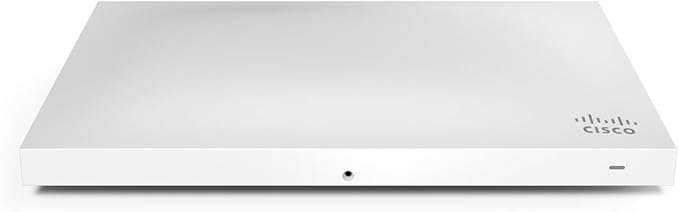
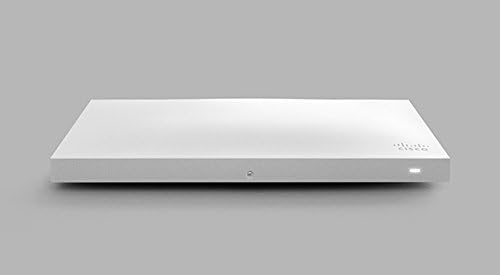
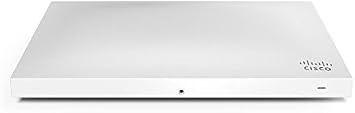
- Cisco Meraki MR42 Wireless Access Point
0 ratings







Item #:
7184084
Cisco Meraki MR42 Wireless Access Point
Item #:
7184084
AUD 189
Price Details
Excluding Shipping & Custom charges ( Shipping and custom charges will be calculated on checkout )
*All items will import from US
38%
Afterpay Information

Split your bill into 4 payments of AUD 47.25 interest-free
 Add the item to your cart
 Select Afterpay at checkout
 Fill in your details
 Complete your first payment
and pay the remaining in easy instalments or according to the payment plan you selected
Here’s why you should Afterpay it

Get everything you need now..
Shop thousands of brands and millions of products, online and in-store.

Pay over six weeks.
Make the first payment upfront and the rest over time. Always interest-free when you pay it in 4.

No fees when you pay on time.
We’ll send you reminders and cap late payments to help you get back on track.
(1) Terms and conditions. apply. (2) Installment Agreement. (3) Eligible for customers in. Australia, (4) Your final payment plan may vary depending on your credit history.
0 ratings
Write a review
In stock
 Imported from USA store
QTY:
Only 7 items left in stock.
Order now and get it around Wednesday, August 26
Secured transaction
Ubuy works hard to protect your security and privacy. Our advanced payment security system ensures confidentiality by encrypting your information during transmission using AES (Advanced Encryption Standards) and SSL (Secure Socket Layer) protocols. Your payment details are 100% secure as we do not share your payment details with third party sellers.
Our Top Logistics Partners


The Cisco Meraki MR42 offers high-performance, security, and simple management for high-density deployments in various settings without additional cost or complexity.

Buy Now Pay Later

Fast
Shipping

Free
Return*

Secure Packaging

100% Original Products

PCI DSS Compliance

ISO 27001 Certified


Note: Step Down Voltage Transformer required for using electronics products of US store (110-120). Recommended power converters Buy Now.


What Stands Out
Cloud Management
Simplify network management with cloud intelligence. Remotely monitor and control network settings, reducing IT overhead and enhancing troubleshooting efficiency for businesses of all sizes.
High Performance
Experience robust connectivity with dual-band capabilities and 802.11ac support. Deliver fast and reliable Wi-Fi performance, ensuring seamless streaming and browsing for users in busy environments.
Secure Networking
Protect sensitive data with built-in security features. Advanced encryption and user authentication help safeguard networks, making it an ideal choice for enterprises concerned about cybersecurity.
Product Details
- Four radio, cloud-managed 3x3 MU-MIMO 802.11ac Wave 2 access point
- Provides maximum 1.9 Gbps aggregate dual-band frame rate
- Dedicated third radio for real-time WIDS/ WIPS with automated RF optimization
- Integrated fourth radio for Bluetooth Low Energy (BLE) scanning and Beaconing functionality
- 100% cloud-managed via the intuitive, browser-based Meraki Dashboard
- Power Over Ethernet (POE) AC power injector sold separately. Meraki access point licensing required
| Other Special Features of the Product | Access Point Mode, WPS |
| Frequency Band Class | Dual-Band |
| Wireless Compability | 802.11ac |
| Compatible Devices | Radio |
| Antenna Location | Radio |
| Connectivity Technology | Wi-Fi |
| Antenna Type | Fixed |
| Operating System | Cisco IOS |
| Security Protocol | WPS, WPA2-Enterprise |
| Number of Ports | 1 |
| Control Method | Touch |
| Data Transfer Rate | 1900 megabits_per_second |
| LAN Port Bandwidth | 1000 Mbps |
| Voltage | 12 volts |
| Maximum Upstream Data Transfer Rate | 1900 megabits_per_second |
| Number of Antennas | 3 |
| Wi-Fi Generation | Wi-Fi 5 |
| Connectivity Protocol | Wi-Fi |
| Controller Type | Switch |
| Coverage | High-density, large areas |
| Frequency | 2.4 GHz |
| Brand | Meraki |
| Model Name | mr42 |
| Model Number | MR42-HW |
| Unit Count | 1 Count |
| UPC | 714953349474 779184055457 |
| Manufacturer | CISCO SYSTEMS - ENTERPRISE |
| Mfr Part Number | MR42-HW |
| Item Weight | 1.5 pounds (680 grams) |
| Color | White |
| Special Feature | Access Point Mode, WPS |
| Wireless Communication Standard | 802.11ac |
| Recommended Uses For Product | Radio |
Who Should Buy?

-
Small Businesses
Ideal for small businesses seeking reliable and easy-to-manage wireless connectivity with robust performance and security features.
-
Educational Institutions
A great choice for schools needing consistent connectivity for students and staff across multiple devices in large areas.
-
Remote Management
Perfect for organizations requiring remote monitoring and management capabilities to ensure network reliability from anywhere.

-
Home Users
Not suitable for casual home users who may find the enterprise-level features and management unnecessary and complex.
Product Description
Have any Query? Chat with us
Customer Questions & Answers
-
Question:
What are the features of the Cisco Meraki MR42 Wireless Access Point?
Answer: The Cisco Meraki MR42 offers robust features including dual-band 802.11ac support, advanced security with built-in firewall capabilities, and seamless integration with Cisco Meraki's cloud management platform. This access point is ideal for environments requiring high-density wireless connectivity, making it suitable for schools, offices, and public venues. The cloud management allows for real-time analytics and firmware updates, simplifying network maintenance and management. -
Question:
How do I set up the Cisco Meraki MR42?
Answer: To set up the Cisco Meraki MR42, connect it to your network via Ethernet, then access the Meraki dashboard online. Add your access point by entering its serial number. Configuration options allow you to set SSIDs, security policies, and guest access if needed. The intuitive interface ensures that users can deploy advanced settings without needing extensive networking knowledge, making it a preferred choice among businesses looking for efficiency and control. -
Question:
Is the Cisco Meraki MR42 suitable for large spaces?
Answer: Yes, the Cisco Meraki MR42 is specifically designed to cater to large spaces with high user density. It supports multiple simultaneous connections and is optimized for high throughput, ensuring reliable performance in open areas like auditoriums, shopping malls, or public Wi-Fi networks. Its ability to integrate with other Meraki devices creates a scalable network solution, allowing businesses to expand coverage as needed. -
Question:
What makes the MR42 different from other access points?
Answer: The MR42 stands out due to its cloud-managed architecture, allowing for centralized control and monitoring of multiple devices from anywhere with internet access. It also features automatic RF optimization, ensuring optimal performance without manual tuning, and integrated security tools like intrusion detection and prevention. These capabilities make it a superior choice for organizations seeking a comprehensive and reliable wireless network solution. -
Question:
Can I use the Cisco Meraki MR42 for outdoor applications?
Answer: While the Cisco Meraki MR42 is primarily designed for indoor use, it can be deployed in semi-outdoor environments, such as covered patios or walkways, where direct exposure to harsh weather is limited. It is generally recommended for use in controlled indoor environments where performance and security are key. For outdoor applications, consider alternatives specifically built for that purpose. -
Question:
What is the range of the Cisco Meraki MR42?
Answer: The typical range of the Cisco Meraki MR42 is up to 200 feet indoors and can extend further outdoors, depending on environmental factors. The dual-band feature allows it to operate on both the 2.4GHz and 5GHz bands, effectively distributing traffic and reducing interference. This adaptability makes it great for diverse settings, from small offices to multi-floor buildings, ensuring stable connectivity. -
Question:
Does the MR42 support guest networking?
Answer: Yes, the Cisco Meraki MR42 supports guest networking, allowing users to create a separate SSID for visitors. This feature enhances network security by isolating guest traffic from internal resources. Administrators can customize access controls, bandwidth limits, and usage policies for guests, making it particularly useful for businesses like cafes, hotels, and event venues. -
Question:
What type of clients can connect to the MR42?
Answer: The Cisco Meraki MR42 can connect to a wide range of clients, from smartphones and laptops to IoT devices, all of which can efficiently access the network. Its support for the 802.11ac Wi-Fi standard ensures fast and reliable connections for all device types. This versatility helps organizations support diverse user needs, from casual web browsing by customers to bandwidth-intensive applications used by employees. -
Question:
How does cloud management enhance the MR42 experience?
Answer: Cloud management with the Cisco Meraki MR42 allows for real-time monitoring, analytics, and the ability to configure settings from any web-enabled device. This feature simplifies troubleshooting and updates, as everything can be managed from one centralized platform. Whether you're a network administrator managing multiple sites or a small business owner, this cloud approach provides greater flexibility and efficiency in managing your wireless network. -
Question:
Where can I buy the Cisco Meraki MR42 Wireless Access Point?
Answer: You can buy the Cisco Meraki MR42 Wireless Access Point at Ubuy in Australia. Ubuy offers a reliable platform with a vast selection of tech products, ensuring you can find this access point along with detailed product information and customer support to assist with your purchase.
Meraki Wireless Access Points MR42-HW Editorial Review

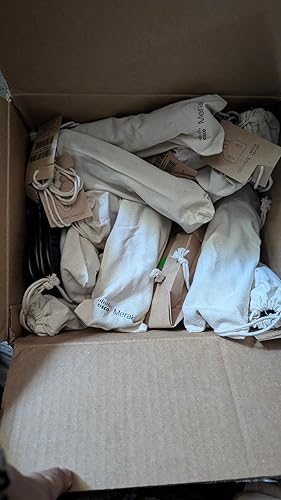
The Cisco Meraki MR42 Wireless Access Point is a highly reliable and efficient device that provides excellent WiFi coverage. The access point works great with other Meraki devices such as the Meraki MX67C firewall and Meraki MS120-24 switch. The only thing that users need to keep in mind is that licenses are not included with the product, so they need to purchase it separately. Although it's possible to use the device without a Meraki router, users will need to have a Meraki AP license to activate the device. To purchase a license, users can contact the manufacturer or find other sellers on Amazon. Additionally, the license orders placed on Amazon are sent through Amazon messages, so users need to keep an eye on their inbox. The device's installation is straightforward, and users can contact the manufacturer directly with any questions.
Customer Reviews & Ratings
11 customers ratings
-
5 Star
40%
-
4 Star
16%
-
3 Star
15%
-
2 Star
0%
-
1 Star
29%
Review this product
Share your thoughts with other customers
Pros
- Works great with other Meraki devices
- Provides excellent WiFi coverage
- Easy to install
- Direct technical support available from the manufacturer
Cons
- License not included
Platform Trust & Buyer Confidence

CJ
Chris
Verified buyer
“Promt delivery. Seems like a good product.”
22 July 2026 · via Trustpilot
SM
Scott
Verified buyer
“It was the best service ever received by any company from my online shopping experience in the last 10yrs”
11 July 2026 · via Trustpilot
TD
Terri
Verified buyer
“so easy to order delivery was way earlier than i expected”
3 July 2026 · via Trustpilot
GC
Gavin
Verified buyer
“Very impressed with the speed at which I received my package from the United States to Australia. Highly recommended.”
21-Jul-26 · via Trustpilot
J
Jeannie
Verified buyer
“Very efficient service. Hassle-free. Excellent product. Have ordered several times.”
17-Jul-26 · via Trustpilot
Secure Checkout
Global Delivery
Easy Returns
Genuine Products
Product Price History
Important information
- Limitations : For products shipped internationally, please note that any manufacturer warranty may not be valid; manufacturer service options may not be available; product manuals, instructions, and safety warnings may not be in destination country languages; the products (and accompanying materials) may not be designed in accordance with destination country standards, specifications, and labeling requirements; and the products may not conform to destination country voltage and other electrical standards (requiring use of an adapter or converter if appropriate). The recipient is responsible for assuring that the product can be lawfully imported to the destination country. When ordering from Ubuy or its affiliates, the recipient is the importer of record and must comply with all laws and regulations of the destination country.
- Not all the products listed on Ubuy are for sale, as Ubuy is a global search engine. Products are subject to export/trade regulations.
AUD 189
Order now and get it around Wednesday, August 26
This item is not restrict in my country.(Please click on above link if this item is not restrict in your country, So our team will review and allow.)
QTY:
Only 7 items left in stock.
Secured transaction
PCI DSS compliant and ISO 27001:2022 certified, with encrypted payments and full buyer protection on every order.
Our Top Logistics Partners
Fastest cross-border delivery
Features & Benefits
- 4 radio, cloud-managed access point
- 1.9 Gbps aggregate dual-band frame rate with concurrent 802.11ac Wave 2 and 802.11n 3x3:3 MIMO radios
- Real-time WIDS/WIPS with automated RF optimization
- Intuitive, browser-based Meraki Dashboard
- Layer 7 traffic management
- Compatible with 802.3af Power Over Ethernet (POE)
- Licensing Required
Ubuy Assurance
Experience worry-free shopping with 100% original products, PCI DSS-compliant payment security, ISO 27001-certified data protection, the fastest cross-border delivery, free returns *, and secure packaging on every order.